TWiki >
ColorPickerPlugin
Color picker for use in TWiki forms and TWiki applications
This TWiki plugin packages the
Farbtastic color picker , which is a jQuery plugin developed by Steven Wittens of Acko.net. The package adds a color picker to TWiki forms and TWiki applications.
This package adds a
color type to
TWikiForms :
Type
Description
Size
Value
color
Single-line text box and a color picker to pick a color. The color can also be typed into the text box, such as #123456.
Text box width in number of characters
Initial (default) color
Example form definition:
You can also use the color picker directly in your HTML forms, without having to write any code. Just include this in the topic text:
<form action="...">
%COLORPICKER{ name="text_color" size="12" value="#123456" class="twikiInputField" }%
<form>
This will show an HTML input field named "text_color" and a color picker tied to it.
Parameter
Description
Default
Example
name
Name of input field
(required)
name="text_color"
value
Initial color value, in hexadecimal notation for the combination of Red, Green, and Blue color values (RGB).
(none)
value="#0000ff"
size
Size of input field
(browser default)
size="12"
class
CSS class of input field
(none)
class="twikiInputField"
Additional parameters can be supplied; they will be added to the HTML input field.
Test: (this only works if the ColorPickerPlugin is installed and enabled)
It is also possible to use the color picker in HTML forms with
disabled ColorPickerPlugin:
%INCLUDE{ "%SYSTEMWEB%.ColorPickerPlugin" section="code" }%
<form action="...">
%INCLUDE{ "%SYSTEMWEB%.ColorPickerPlugin" section="picker" NAME="demo_color" SIZE="12" VALUE="#123456" EXTRA="class=\"twikiInputField\"" }%
</form>
This will show an HTML input field named "demo_color" and a color picker tied to it. The
"code" section should be included once per topic, the
"picker" section can be included as many times as needed. The
NAME parameter is required;
SIZE,
VALUE and
EXTRA parameters are optional. Use the
EXTRA parameter to add additional parameters to the HTML input field.
Test: (this works only if the ColorPickerPlugin is installed and disabled)
This plugin is pre-installed. TWiki administrators can upgrade the plugin as needed on the TWiki server.
For an automated installation configure script and follow "Find More Extensions" in the in the Extensions
Or, follow these manual installation
Download the ZIP file from the extension home on twiki.org (see below).
Unzip ColorPickerPlugin.zip Set the ownership of the extracted directories and files to the webserver user.
Install the dependencies (if any).
Plugin configuration and testing
Run the configure script and enable the plugin in the Plugins Configure additional plugin settings in the Extensions Test if the installation was successful using the examples provided.
Set SHORTDESCRIPTION = Color picker for use in TWiki forms and TWiki applications
Related Topics: VarCOLORPICKER ,
TWikiPreferences ,
TWikiForms ,
TWikiPlugins
Copyright © 1999-2026 by the contributing authors. All material on this collaboration platform is the property of the contributing authors.
Ideas, requests, problems regarding Daya Bay?
Send feedback Note: Please contribute updates to this topic on TWiki.org at
TWiki:TWiki.ColorPickerPlugin .

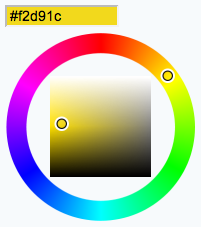
 , which is a jQuery plugin developed by Steven Wittens of Acko.net. The package adds a color picker to TWiki forms and TWiki applications.


 Edit | Attach |
 Copyright © 1999-2026 by the contributing authors. All material on this collaboration platform is the property of the contributing authors.